Recently I have sold a few things on eBay and wondered when I have printed off the postage label – why is my return address wrong? I knew that I had updated my main address on eBay as I had had things delivered to me.
The first time it happened I went in and checked that my address was correct and it did seem to be, so I left it. Then it happened again and I thought there must be something else that I needed to change.
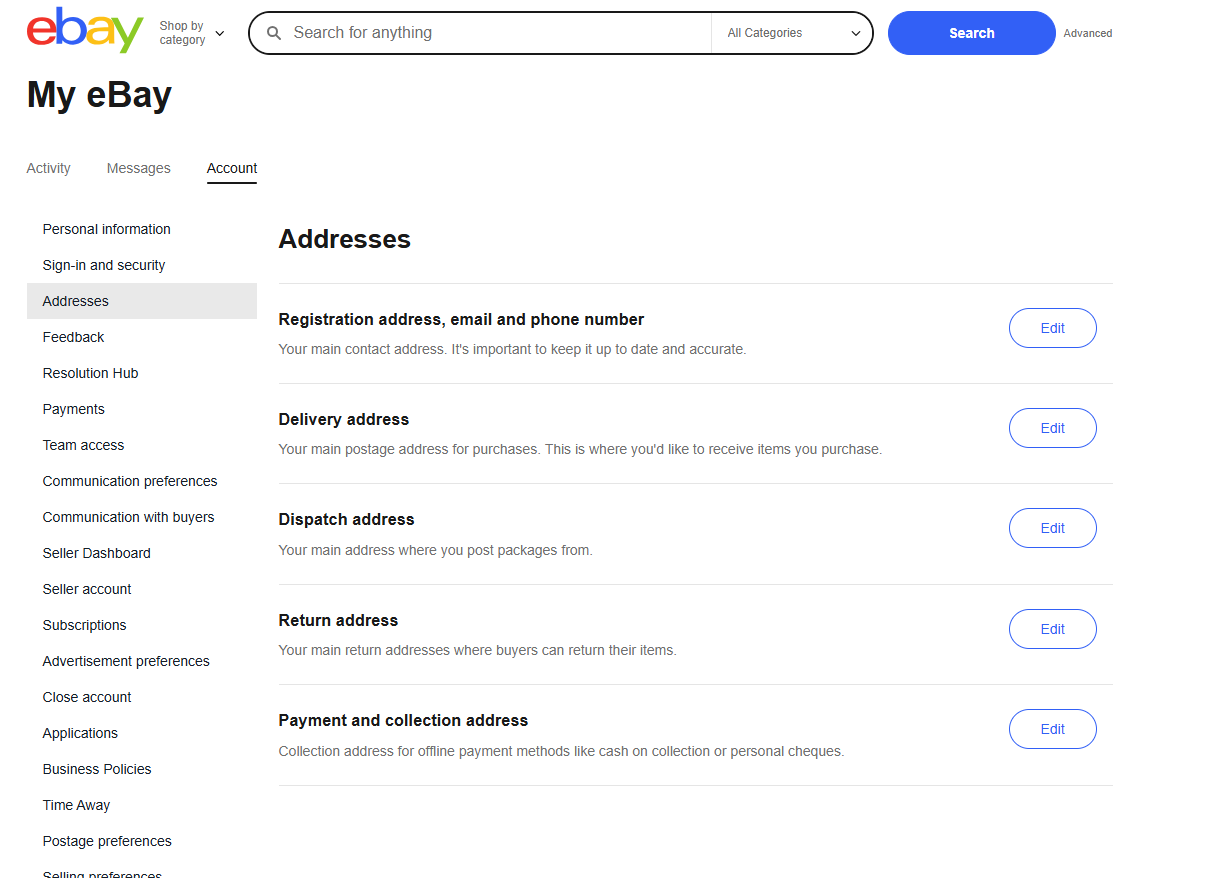
It is not that easy to dig in and find where you need to change all your addresses but when you get there you will find that there are five address options. They are:
- Registration address
- Delivery address
- Dispatch address
- Return address
- Payment and collection address
It seems strange that there is not an option to change all addresses and also I wonder if this has changed recently as, when I checked my payment and collection address, it was an address I lived in about 12 years ago!
In order to find where these addresses are stored, depending on the device you are on you get different options. And it appears that some options are not visible on a mobile device.
On a PC: Go to My eBay, then click on Account, Addresses. This will bring you to this page:
Mobile: Account Settings (at this point Delivery address is visible which was the correct one for me). Then scroll down to Selling and you will see a couple of options for addresses there – Posts from address and return address.
As they both look quite different it is easy to miss where you need to update these. When you move house, you can’t just do one update it appears.
Unfortunately, once you have printed a label it seems that you can’t change the settings of the return address and print it again so you really need to check that the return address is correct before you print the label, especially if you have moved house recently.


